
We all use social media, and children are no exception. But most popular social media apps aren't safe spaces for teens or kids, exposing them to filter-free mature content. In fact, WhistleOut polled over 1,000 phone users, and 61% of Americans believe that children having access to cell phones contributes to anxiety and depression, and the demand for safer alternatives has never been higher.
Parents agree that safety features are of the utmost importance for a child's cell phone, so I downloaded and tested 8 social and messaging apps designed for kids and teens to find out which ones deliver on their safety promises. I discovered the best options available right now, from AI-moderated messaging systems to creativity-first video platforms, evaluated on moderation standards, parental controls, data privacy practices, and whether kids will actually want to use them.
Keep kids connected on a plan built for families
Whether your child has their first or second phone, the right phone plan keeps the whole family connected.
Here are the most popular family plans available today:
Best safe social media apps for kids at a glance
| App | Available on | Price | Ages | Best for |
|---|---|---|---|---|
| Sage Haven | iPhone, Android waitlist | Free | Under 13 | First-time messaging with AI moderation for full parental transparency |
| Kinzoo | iPhone and Android | Free | Under 13 | Family messaging with interactive story paths |
| Messenger Kids | iPhone and Android | Free | Under 13 | Parent-approved messaging and video calls (parent needs an active Facebook account) |
| YouTube Kids | iPhone and Android | Free | 4–12 | Video content with parental controls and supervised teen options |
| Zigazoo Kids | iPhone and Android | Free | 8–12 | Creative video sharing with strict age verification |
How I evaluated the safest social apps for kids
I evaluated each app based on its real-world safety record and design philosophy, not just its marketing claims. Here's what I looked for:
- Moderation standards: Human moderation and AI filtering are important. I looked at how each platform reviews content before it reaches a child's screen.
- Parental controls: Can a parent see, approve, and limit who their child communicates with? The best apps make this easy.
- Data privacy: Does the app collect and sell children's data? I checked each app's COPPA compliance status and privacy policy.
- Addictive design: Likes, streaks, follower counts, and infinite scrolling are red flags. Safe apps for kids are designed to connect, not to addict.
- Kid appeal: An app parents love but kids won't use isn't a solution. I considered whether each platform gives children a reason to actually show up.
1. Sage Haven: The AI-moderated messaging system built for first-time texters

- Free
- Available for iOS (Android coming soon)
- Also available as an Apple Watch app
Sage Haven is a complete messaging app for kids and tweens, and after testing it, I think it's the best thing to happen to kids' online safety in a long time. Of all the apps I tested, Sage Haven was the only system that made the cell phone experience safe. Your kid gets a Sage phone number, but parents control who can make contact and who can't. Plus, the phone number assigned is compatible with iMessage and Google Messages, so you aren't forced to always use Sage Haven for contact. It's a safe, parental-observed phone number that feels like your phone's default. On top of it all, parents get content alerts and recaps on conversations.
When I have kids ready for their first phone, I'm using Sage Haven.
And did I mention that it works on Apple Watch for families who want to delay smartphone access entirely? Android users have to wait a little while longer, but Sage Haven will soon be available on the Google Play Store for phones and wearables too.
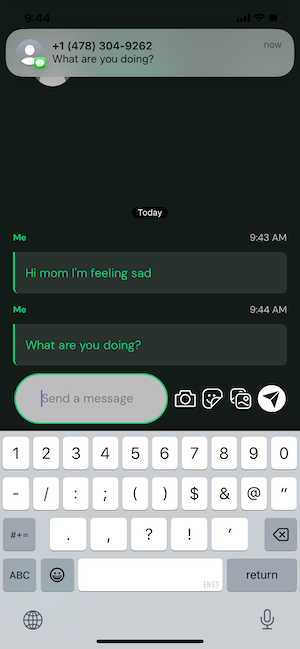
Image: Jessica Santero | WhistleOut
Adults start by setting up a parent account and then linking children's accounts. Sage Haven charges a small fee to use, and it's the best deterrent against unwanted users. All new users have to pay a $0.29 verification fee. It filters out potential threats by creating a purchase history with transactional proof that someone downloaded the app, which is incredibly smart and a small detail that goes one step further to keep underage users safe.
Parents can also set up Face ID on their account so no curious child can access the settings and make changes. Every contact requires manual parental approval before your child can exchange a single message with them, and you can deny contacts directly from the parent dashboard.
Your kid or teen won't be able to get into any mischief either since there are only two options in Sage Haven: messaging or calling. And always to your pre-approved numbers. It's impossible to contact anyone who isn't on your list.
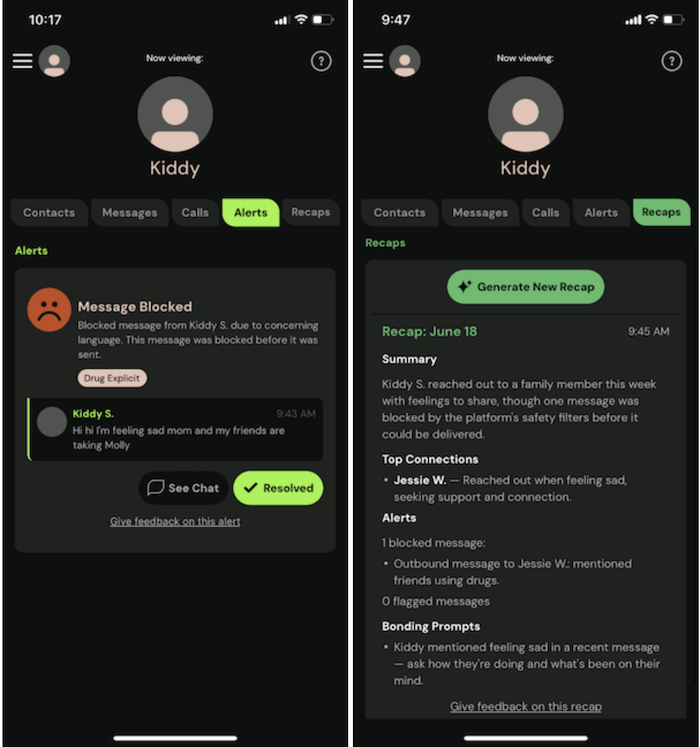
Image: Jessica Santero | WhistleOut
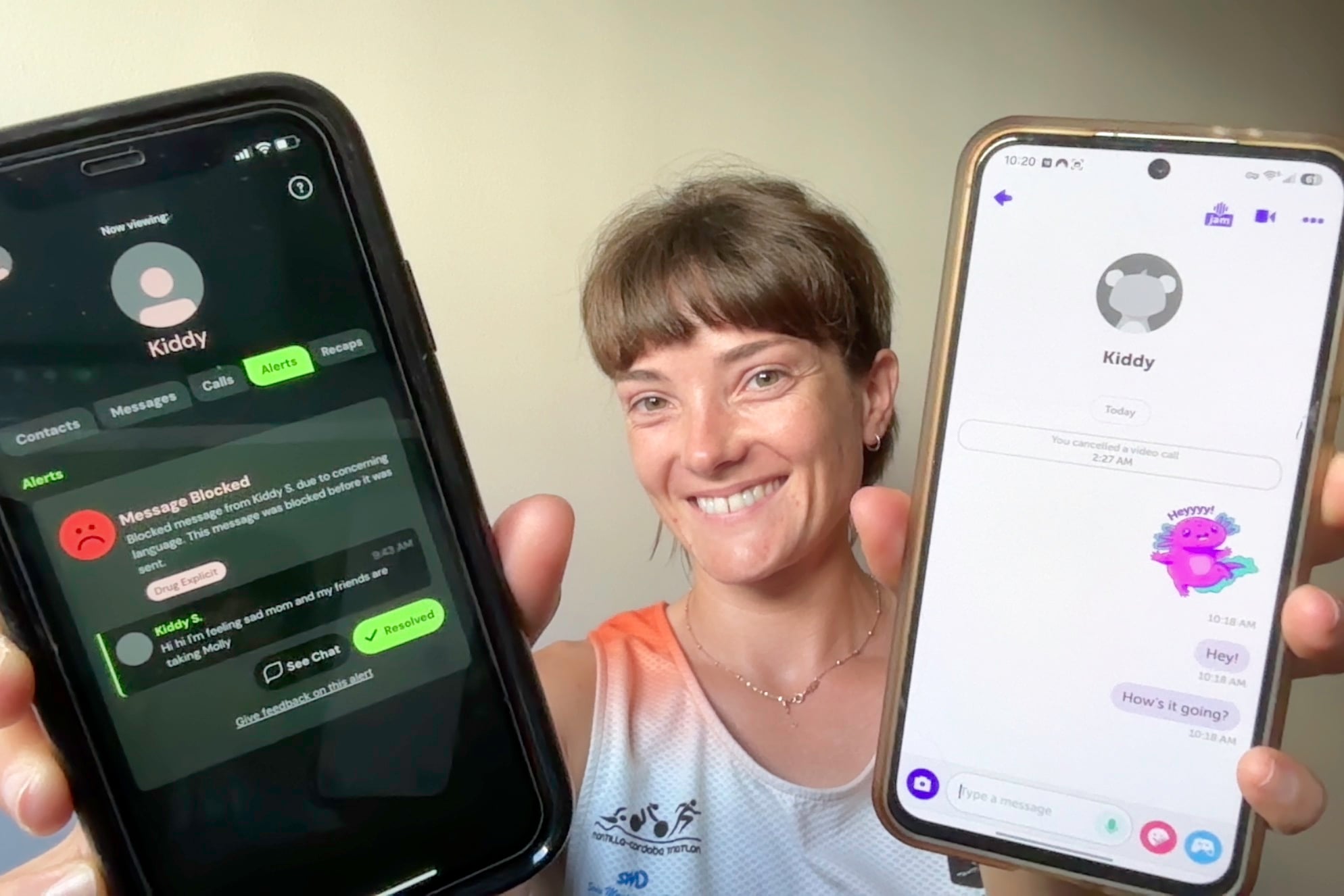
The recap button is one of my favorite Sage Haven features, and of course, I had to put it to the test. I sent two messages from the kid account. One included the word "sad" and the other "drugs." Sage Haven flagged them immediately and sent my parent device a distinct double notification alert so I knew it was a Sage Haven notification and not a regular text.
The recap did much more than flag the words: it summarized the full conversation, identified the emotional content, suggested concrete ways to follow up with your child, and showed the blocked message for review. In a world with limited online security, Sage Haven gives parents control over what their youngsters see and hear while messaging on their first phones.
Is your kid ready for their first phone?
If your child is getting their first device, choosing the right plan matters as much as choosing the right app. Mint Mobile lets you create a family plan with specific kids' plans, so parents control how much data the youngest members need.
Mix and match data plans (and downgrade if needed) with Mint so everyone in the family stays happy.
2. Kinzoo: The kids' messenger built around purpose, not scrolling

- Free
- Available for iOS and Android
Kinzoo combines the feel of a messaging app with interactive AI features, giving kids the social experience they want without the social media risks they don't need. In Kinzoo, your child only communicates with family and approved contacts. You have to set up both a parent account and a child account, then link them to approved family and friends.
Limit screen time in your phone's settings
Worried your kids are spending too much time on their phones? Set up screen time limitsin under 5 minutes for both iPhone and Android devices. With daily limits in place, you won't have to keep track of how long your kid has been scrolling. Plus, you can add certain harmful apps to a banlist to keep your youngest cell phone users safe.
Kids can send messages, make calls, share stickers, and follow interactive story Paths free from public access. That means there's no randomized feed, no strangers, and no algorithm deciding what they see next. However, the app does require four permissions to work properly: notifications, camera, microphone, and call management, which ensure calls come through even while the app is running in the background.
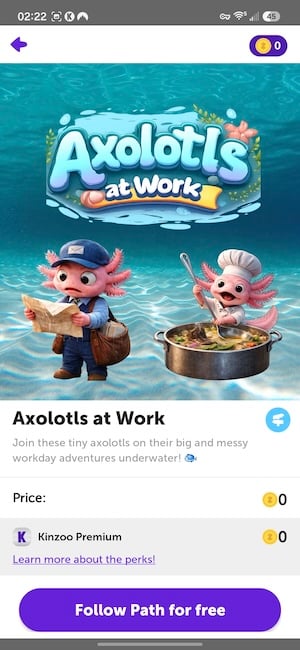
Image: Jessica Santero | WhistleOut
Paths are interactive AI-driven stories delivered through the messaging interface itself. I followed one called Axolotls at Work, where I helped an axolotl repair the lake's favorite rocks and earned an invitation to ride a floating hammer. The AI-generated images illustrating each step and an axolotl face filter available for the full experience were very fun to play with. The endless amount of filters reminds me of Snapchat, but in an almost educational way with Kinzoo's Paths.
I really like how you can interact with Kinzoo's AI for educational messaging.
Completed Paths appear at the top of the homescreen in a format you'll recognize from stories on other platforms like Instagram's stories. Paths give kids something to do inside the app beyond just chatting, making it an app like Snapchat for kids—but better.
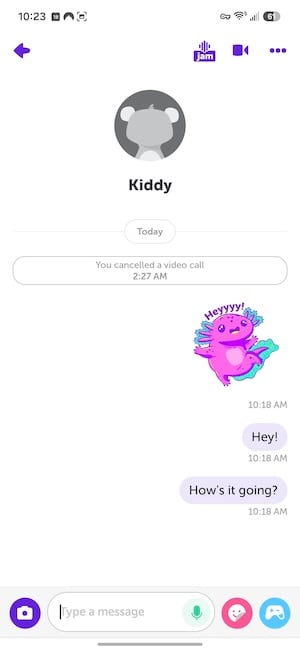
Image: Jessica Santero | WhistleOut
My only gripe with Kinzoo is the token system: Basic messaging and Paths are free, but some stickers, special filters, and mini games require tokens, and the token count is visible to kids throughout the app. I am not a fan of having monetized material in front of kids, but I think this app is unique in that kids can explore curiosity without succumbing to trending music snippets and dances. Kinzoo is one of the best kid-friendly social media apps available for families with younger children.
What Reddit says about Kinzoo
Parents praise Kinzoo's design philosophy. One reviewer shared in r/SingleDads, "I use this to talk to my 8- and 10-year-olds. It's safer than Facebook and way more adorable! We have so much fun playing the games, and it's teaching them how to be responsible online in the future."
Sage Haven and Kinzoo are both COPPA certified
COPPA stands for the Children's Online Privacy Protection Act, a U.S. federal law that governs how apps and websites collect, use, and share personal data from children under 13. Apps that earn COPPA certification have been verified to meet these legal standards, which means they can't collect more personal data than necessary to operate and can't share that data with third-party advertisers.
Most mainstream social media platforms are not COPPA compliant for users under 13. Both Sage Haven and Kinzoo have COPPA certification, making them two of the few messaging apps on the market that are legally and independently verified to protect your child's data.
Upgrade devices for the whole family
Whether you've got one kid or four, upgrading devices can be costly. Here are the best phone deals at the moment to help you save on newer phones for your family:
3. Messenger Kids: Parent-approved messaging (if you already have Facebook)
- Free
- Available for iOS and Android
Messenger Kids is a free messaging app from Meta designed specifically for children under 13. It includes a parent-approval system that controls every contact your child can have. If you already know and love Messenger, then you'll love this kid-friendly version. It works the exact same, but as the parent, you control who your kid contacts. Just download the app on their phone, log in with your account to verify the device, and then control all the other aspects from your own device.
If you already have Facebook, this app is a no-brainer.
Every message, video call, and group chat happens only between contacts a parent has manually approved, and the app runs without any advertising. That said, it is a Meta product, a company that was found liable in a landmark 2026 social media addiction trial, but that verdict applies to its adult platforms. Messenger Kids was built under a different set of design principles, and the safety structure reflects that distinction.
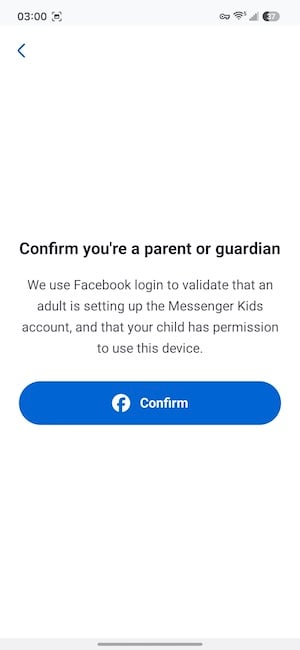
Image: Jessica Santero | WhistleOut
The parent dashboard gives you full control over your child's contact list and lets you review app activity at any time. Parents can also set bedtime controls to disable the app during specific hours, which is a practical feature for families managing screen time across multiple devices.
The kid-facing experience includes animated face filters, stickers, GIFs, and drawing tools that younger children will enjoy. Messenger Kids covers the basics of safe messaging well, but it doesn't go much further than that.
If you don't have Facebook (like me), setup is a nightmare. Messenger Kids requires an established, verified Facebook account before you can activate it for a child. When I created a new Facebook profile specifically to test the app, Facebook declined to grant access to Messenger Kids on any device because the account was too new to be trusted. If you have been off Facebook for years or never had an account, expect a significant barrier before you can get your child set up. Make sure you have an active, verified Facebook account ready before you download this for your child, or the process will stall before it begins.
What Reddit says about Messenger Kids
The setup hiccup comes up regularly, according to Reddit users who try this app. One parent shared in r/daddit, "Getting started took way longer than it should have. Facebook kept flagging my account and I almost gave up. Once it was running it was fine, but the setup was horrible."
Safe communication starts with a safe connection
Kids using Messenger Kids over cellular data benefit from an unlimited plan that does not surprise you with overage charges.
Here are the most popular family-friendly plans:
4. YouTube Kids and Google Family Center: Curated videos for kids, supervised access for teens

- Free
- Available for iOS and Android
If your kid has ever been within ten feet of a tablet, they've probably already found YouTube. YouTube Kids is the version parents can feel okay about, with a completely separate app, curated content, and no comment sections or recommended rabbit holes into adult territory. It's designed for ages 4–12 and uses a combination of automated filtering and human review to keep content age-appropriate.
YouTube Kids prevents sketchy content from popping into your children's recommended videos.
With a Kids YouTube account, parents manually approve every video or channel your child watches (in Approved Content mode), set daily screen time limits, and disable the search function entirely if you want your child to only watch what you've greenlisted. There are four content-level settings tied to age ranges, from Preschool to Older Kids, each unlocking progressively more content.
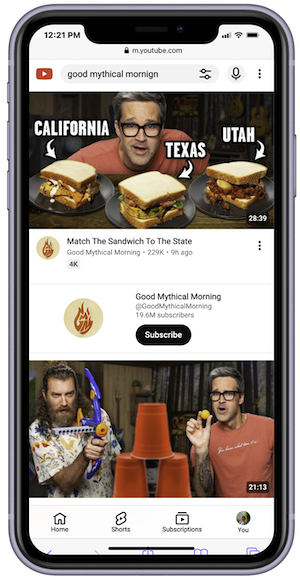
Image: Jessica Santero | WhistleOut
For older kids who have outgrown YouTube Kids but aren't ready for unrestricted access, the Google Family Center offers a supervised experience for teens on standard YouTube. Parents can invite a teen through Google Family Center and set content restrictions and screen time limits without a subscription requirement.
The teen account accesses regular YouTube rather than the YouTube Kids library, so your teen has more privacy than the YouTube Kids experience. It gives parents visibility over a teenager's viewing habits without cutting them off from the platform entirely. No automated system catches everything, and some inappropriate content has slipped through YouTube Kids' filters over the years, making the Approved Content mode the most reliable option for younger children.
What Reddit says about YouTube Kids
Parents generally trust YouTube Kids, but recommend using the Approved Content mode for younger children. As one parent noted in r/UKParenting, "It isn't perfect, but switching to the Approved Content setting made a massive difference. Now I know exactly what my 5-year-old is watching because I've personally seen every video in her library."
Stream YouTube Kids without burning through your data
Video streaming adds up fast on a family plan, whether you're on a road trip, getting coffee, or on a playdate. Make sure you're on unlimited data so your kids can watch without you having to watch the data meter.
Check out the most popular unlimited data plans for the family:
5. Zigazoo Kids: A safer TikTok and Snapchat alternative (but proceed with caution)

- Free
- Available for iOS and Android
Zigazoo Kids is a kids' TikTok app alternative that replaces the open social media feed with structured creative prompts. The app was founded by two public school teachers during the pandemic, and that background shows up in how content is organized.

Image: Jessica Santero | WhistleOut
Instead of scrolling through whatever other users feel like posting, kids respond to specific challenge prompts. As I was flipping through my feed, the most creative prompt was "lip sync with a crawfish," and yes, the teen was singing with a literal crawfish. There are no private DMs on the platform, which removes one of the most common vectors for inappropriate contact on kids' apps.
⚠ Proceed with caution
Zigazoo is slightly safer than TikTok, but it's eerily similar. When I tested the app, I was shocked that any adult could make an account and watch young children dancing. There were no checks or verification needed whatsoever. The daily leaderboard was also worrisome. Zigazoo ranks the top creators by likes and the users with the most invites. If you thought the likes on TikTok or Instagram were bad, imagine an app-wide ranking as an incentive to make more likable content.
From the 100 videos I watched during testing, content ranged from 8-year-olds to 17-year-olds, with most posting dancing and lip-syncing. All comments I encountered were positive, and none of the song versions were explicit. Content moderation is more controlled than TikTok or Instagram, but parents of younger girls should be aware that the content skews heavily toward appearance and performance, which is worth a conversation before handing over the app.

Image: Jessica Santero | WhistleOut
The age-verification process is only strict if you want to post content; anyone can watch without any verification. Posting content requires a selfie of the parent and child together, with a blink detection step to confirm a live image. I tested with my face alone, my face alongside a photo, and my face next to a doll, and none of those attempts passed. Skipping the verification step means your child can browse the feed but cannot post or upload images, which is a better setup for younger users.
 How I evaluated these apps
I personally downloaded and tested 8 apps for this article: Sage Haven, Kinzoo, Messenger Kids, YouTube Kids, Zigazoo Kids, Coverstar, and two additional platforms. Each app was evaluated through hands-on use across setup, parental controls, safety features, and the actual kid-facing experience. Where noted, I tested specific safety triggers by sending messages with flagged language to verify that moderation alerts work as described.
Why you can trust WhistleOut
.svg)
15+
years of mobile industry experience

900+
published wireless guides

35+
firsthand carrier reviews
We've been around since the birth of the iPhone. Along the way, we've learned how to spot the best deals for your wallet (and your sanity). We spend our days researching informative guides and writing insightful reviews on every kind of wireless plan, distinguishing what matters from what doesn't. We played around with these plans before recommending them, ensuring they're worth your hard-earned money.
Want to know more? Check out how we review every cell phone plan we rank.
Safe social media apps for kids: FAQ
Which social media platform is the safest for kids?
Sage Haven is the safest social media platform for kids, using AI moderation to block harmful messages before they are sent and requiring parent approval for every contact.
What is a good TikTok alternative for kids?
Zigazoo Kids is the best TikTok alternative for kids, offering a prompt-based video format with stricter moderation than TikTok and no private DMs.
What age should kids start using social media?
Most major platforms set their minimum age at 13, but parents decide when their kids are ready to start using social media—or not.
Are there free social media apps for kids?
All of the recommended apps above are free, including Sage Haven, Kinzoo, Messenger Kids, YouTube Kids, and Zigazoo Kids.
Are there messaging apps for kids?
Sage Haven and Kinzoo are both messaging apps for kids, with parent-approved contacts, no public feed, and safety monitoring built in.
Jessica Santero
Staff Writer

Find a better phone plan
Thousands of cell phone plans unpacked. All the facts. No surprises.


.png?w=280&h=280&usm=20&usmrad=0.8&fit=crop "Cell Coverage Near You: Who Has the Best 5G Network?")


.png?w=280&h=280&usm=20&usmrad=0.8&fit=crop "Best Cell Phone Deals for June 2026: Get the New iPhone 17 for Free")



