
Screen time apps fail when the person who set the limit is the same person who can undo it. Brick solves that problem with a physical object. It's a small NFC device about the size of a saltine cracker, and tapping your phone to it instantly locks your most distracting apps. You can't reverse it in the app settings, can't enter a PIN to unlock it, and can't override it from your couch.
It's one of the most effective picks in WhistleOut's best screen time apps roundup because the accountability is physical, not digital.
Brick
- Price: Free app. $65 physical device required.
- Platforms: iOS, Android
Managing screen time for the whole family? Compare family-friendly phone plans too.
If you're setting limits for multiple people in your household, it's worth making sure your family plan is actually competitive. Many carriers charge significantly more than MVNOs offering the same coverage on every line.
Check out popular plans below.
|
T-Mobile

Experience Beyond
$100.00/mo
with Auto-Pay + Taxes and fees
|
|
Verizon

Unlimited Ultimate
$85.00/mo
+ Taxes & Fees. Price includes AutoPay & Paperless discount.
+ $40 Upfront
|
What is Brick?
Brick is a physical NFC device that pairs with a free app on your phone to lock a customizable list of distracting apps the moment your phone makes contact with it. You set up a permitted list in advance (like maps, your banking app, camera, contacts), and everything outside that list locks on tap. To restore full access, you tap the Brick a second time. Without the physical device nearby, your permitted list is all you get.
Not sure how to update your apps?
Keeping your apps up to date ensures you're always getting the latest features, bug fixes, and security improvements. Learn how to update the apps on your iPhone and your Android. It takes less time than you think.
Why physical accountability works when apps don't
Every app-based screen time tool eventually runs into the same problem: the unlock is always one tap away on the same device you're trying to put down. Brick removes that option. The only way to restore access is tapping the physical device, which means if you don't have it with you, the lockout holds.
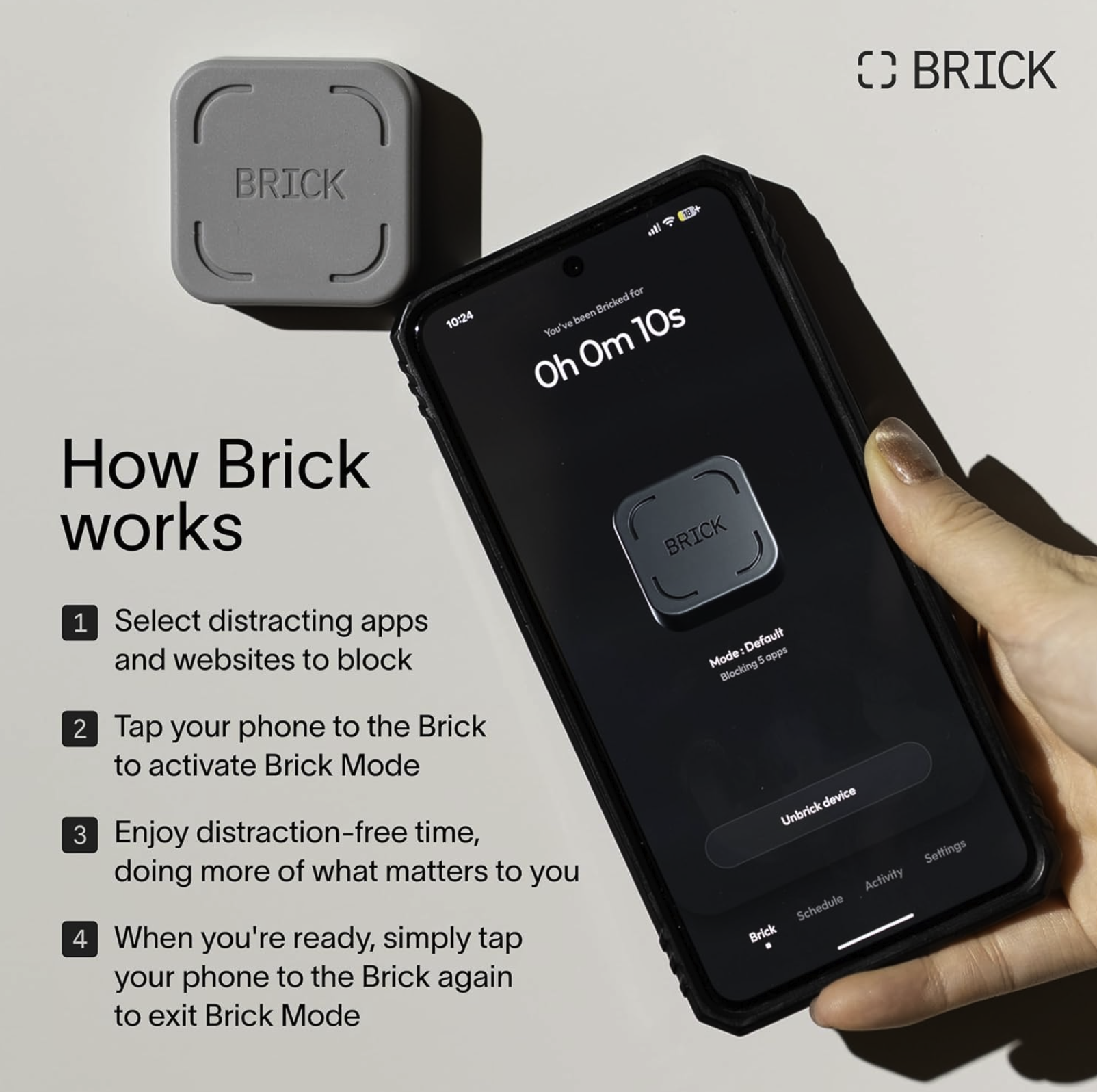
Image: Amazon
There is one safety valve: the Emergency Unbrick feature. Inside the app, you get five lifetime emergency unlock passes per device. Use them all and you have to contact Brick's customer support for more. It's designed to be used genuinely, not as a regular workaround.
Brick also supports connecting one phone to multiple devices, which is useful for creating different blocking environments in different locations. You can have one Brick at your desk for work hours and another at a family member's house for shared sessions.
Why Brick works so well for families with kids and teens
My aunt uses Brick with her 15-year-old and her 10-year-old during study hours. The kids can't access social media or games without physically reaching the device she holds onto. There's no parental control menu to find, no PIN to guess, and no account settings to navigate around. The lockout holds as long as the parent has the Brick.
If your kids are old enough for a smartphone but young enough to need hard limits, Brick is the most tamper-proof option available without buying a dedicated dumbphone. It keeps the phone functional for calls, messages, and maps while blocking everything else on the list.
Same Verizon coverage, lower monthly bill
Verizon MVNOs use the same towers for a fraction of the cost. If you're paying full Verizon prices across multiple lines, comparing MVNO options could save you a significant amount every month.
|
Spectrum Mobile

Unlimited Plus Data
$40.00/mo
+ $20 Upfront
|
|
XFINITY Mobile

Mobile Select Plan
$0.00/mo
(for the first year of service) <br>Regular rate of $30/mo. thereafter
|
|
Twigby Mobile

Unlimited Talk, Text and Data
$25.00/mo
for the first 3 months then $35.00/month
|
How we tested Brick
- Tested the tap-to-lock and tap-to-unlock flow on both iPhone and Android
- Configured multiple permitted app lists for work and family use cases
- Attempted to access locked apps via settings, browser shortcuts, and alternate launch methods
- Evaluated the Emergency Unbrick feature to understand its intended use versus misuse potential
- Tested multi-device pairing by connecting one phone to two separate Brick devices
Why you can trust WhistleOut
.svg)
15+
years of mobile industry experience

900+
published wireless guides

35+
firsthand carrier reviews
We've been around since the birth of the iPhone. Along the way, we've learned how to spot the best deals for your wallet (and your sanity). We spend our days researching informative guides and writing insightful reviews on every kind of wireless plan, distinguishing what matters from what doesn't. We played around with these plans before recommending them, ensuring they're worth your hard-earned money.
Want to know more? Check out how we review every cell phone plan we rank.
Brick: FAQ
How does the Brick device work?
Brick is a small NFC device that pairs with the free Brick app. Tapping your phone against it instantly locks your designated distraction apps, and tapping it again restores full access.
Can you unlock Brick without the physical device?
Each device comes with five lifetime Emergency Unbrick passes accessible inside the app. Once all five are used, you have to contact Brick's customer support for more.
Does Brick work for parental controls?
Brick is best suited for parents wanting a hard lockout on a child's device, since the physical device is required to unlock apps and there's no account menu the child can access to bypass restrictions.
Does the Brick app cost money?
The app is free, but the physical Brick device costs $65. One device can pair with multiple phones, and one phone can connect to multiple Brick devices.
Jessica Santero
Staff Writer

Find a better phone plan
Thousands of cell phone plans unpacked. All the facts. No surprises.


