What's new with Google Messages location sharing
- Real-time location sharing is now available on Android devices.
- You can share your location for one hour, the rest of the day, a custom duration, or indefinitely until you turn it off.
- Everything happens inside the Messages app.
- The "Until I turn it off" option requires RCS (Rich Communication Services) to be enabled on both devices.
Google Messages just got a feature Android users have been waiting for: the ability to share your live location directly inside a text conversation. There's no need to open Google Maps or download anything extra. Just tap a button inside the chat, and the other person can see exactly where you are in real time.
Tech outlet BGR confirmed the feature is live as of March 20, 2026, after spotting it on a Samsung Galaxy S25 Ultra. The rollout is still in progress, so not every Android phone will have it today. But if your Google Messages app is up to date, it may already be there.
How to share your live location in Google Messages
The whole process takes about 30 seconds. Here's how to do it:
- Open a conversation in Google Messages.
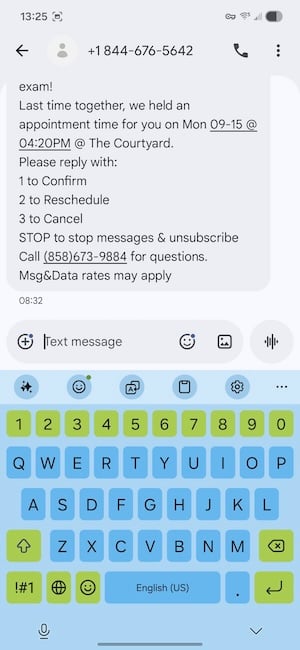
Open the conversation you want to share your location in.
Image: Jessica Santero | WhistleOut - Tap the + icon next to the text field to open the attachments menu.
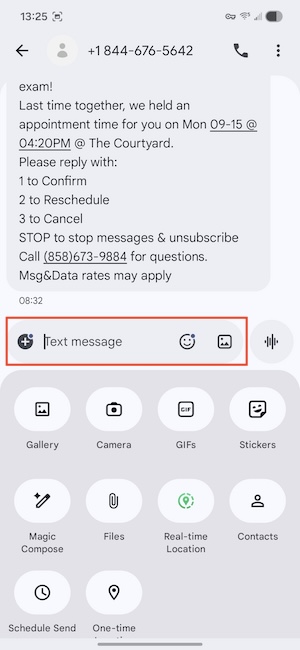
The + icon opens the attachments menu, where you'll find the location option.
Image: Jessica Santero | WhistleOut - Select Real-time location. If you haven't given Messages access to your location yet, you'll be prompted to allow it.
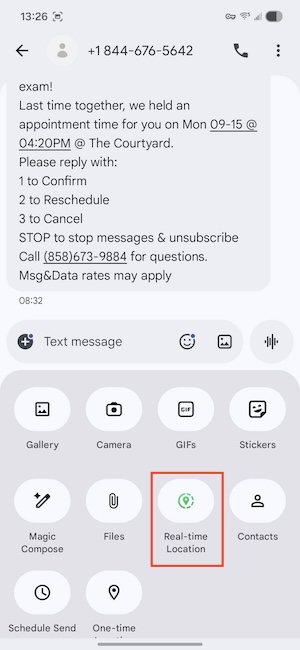
Real-time location appears as an option in the attachments menu.
Image: Jessica Santero | WhistleOut - Choose your sharing duration. Options include one hour, that day, a custom time window, or until you turn it off manually.
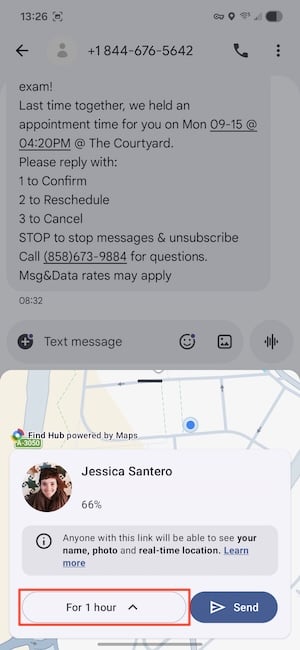
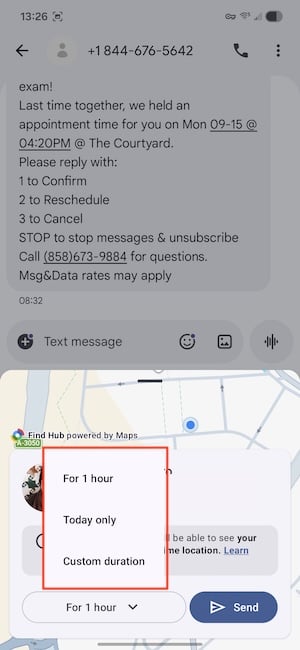
You can share for one hour, that day, or a custom duration.
Image: Jessica Santero | WhistleOut - Tap Send.
Your location appears live inside the conversation thread. When the timer runs out, sharing stops automatically — you don't need to go back in and end it yourself.
For a full walkthrough with screenshots, check out our step-by-step guide to sharing your live location in Google Messages.
Pro tip: Send the share before you lose signal
You need a data connection or Wi-Fi to send the initial share, but once it's active, your location updates run on GPS and don't require an ongoing connection. If you're heading somewhere with spotty coverage (a festival, a national park, a remote trailhead), send the share before you leave Wi-Fi range. It'll keep updating even if you lose signal after that.
What Google Messages live location sharing can't do (yet)
This feature only works between two people who are both using Google Messages. It won't cross over to iMessage, WhatsApp, or any other messaging platform. If the person you're trying to share with is on iPhone, Google Maps is still your best option — the recipient only needs a Google account, not the app itself.
The "Until I turn it off" option only appears when your contact has RCS enabled. RCS (Rich Communication Services) is the modern messaging standard that replaced SMS — it's what gives Google Messages features like read receipts and better photo quality. Most newer Android phones have it turned on by default, but if that option isn't showing up for you, that's likely the reason. Timed options (one hour, that day, custom) work over regular SMS without any issue.
The rollout is also gradual. BGR confirmed it on the S25 Ultra as of this writing, but Google typically pushes new features to all Android users over days or weeks, not all at once. If you don't see it in the + menu yet, check that your Google Messages app is updated to the latest version.
Why this update matters for Android users
Location sharing has been a built-in feature on iPhone through Find My for years. Android had Find Hub and Google Maps sharing, but both required leaving the conversation and walking the other person through a separate setup — enough friction that most people skipped it for a quick meetup.
Moving it into Google Messages removes that extra step entirely. For parents coordinating with kids, people meeting up at large events, or anyone traveling with a group, that's a meaningful upgrade over the current workaround.
Still on a limited data plan?
Live location sharing is exactly the kind of feature that makes unlimited data worth having. If you're still watching your data usage every month, it might be time to upgrade—and you don't have to pay a premium price to do it.
Here are some of the best unlimited plans available right now.
|
Spectrum Mobile

Unlimited Plus Data
$40.00/mo
+ $20 Upfront
|
|
Tello

Unlimited Text, Talk, and Data Plan
$25.00/mo
|
|
PureTalk

Unlimited Data w/ 30GB Hotspot Plan
$15.00/mo
|
Google Messages real-time location sharing: FAQs
Does Google Messages live location sharing work with iPhone users?
The feature only works between two people who are both on Google Messages. For cross-platform sharing with iPhone users, Google Maps is the most reliable option — the recipient only needs a Google account, not the app itself.
Do I need RCS to use location sharing in Google Messages?
Timed sharing (one hour, that day, or a custom duration) works over regular SMS without RCS. You only need RCS enabled on both devices to unlock the indefinite "Until I turn it off" option.
When will Google Messages live location sharing roll out to all Android phones?
The feature is confirmed live as of March 20, 2026, but Google rolls out updates gradually over days or weeks. If you don't see it yet, make sure your Google Messages app is updated to the latest version.
If you need something that works across platforms, our roundup of the best location-sharing apps for travel covers what works regardless of what phone the other person has.
All the latest cell phone news and deals, delivered every Thursday.
Jessica Santero
Staff Writer

Find a better phone plan
Thousands of cell phone plans unpacked. All the facts. No surprises.


.png?w=280&h=280&usm=20&usmrad=0.8&fit=crop "Best Cell Phone Deals for August 2026: Get the New iPhone 17 for Free")