
The problem with themes you can download from the Samsung Galaxy Store is that you can find something that's close to what you want, but the details are always someone else's choices—the icon shape they picked, the shade of blue they thought looked good, the keyboard style that doesn't quite match anything else. You're wearing off-the-rack when you want something tailored.
Theme Park is the tailoring option.
It's the most visually expansive module in Samsung's Good Lock suite, and it turns any wallpaper into the foundation for a coordinated theme that covers every major visual surface on your phone. No design experience required—the color palette generation is automatic.
What is Theme Park?
Theme Park is a free Good Lock module that extracts a coordinated color palette from your wallpaper and applies it across Samsung Keyboard, Quick Settings, the volume panel, and your icon pack—with separate light and dark mode themes built simultaneously. Manual color overrides are available if you want to adjust anything the auto-generation gets wrong.
How the wallpaper-to-theme workflow works
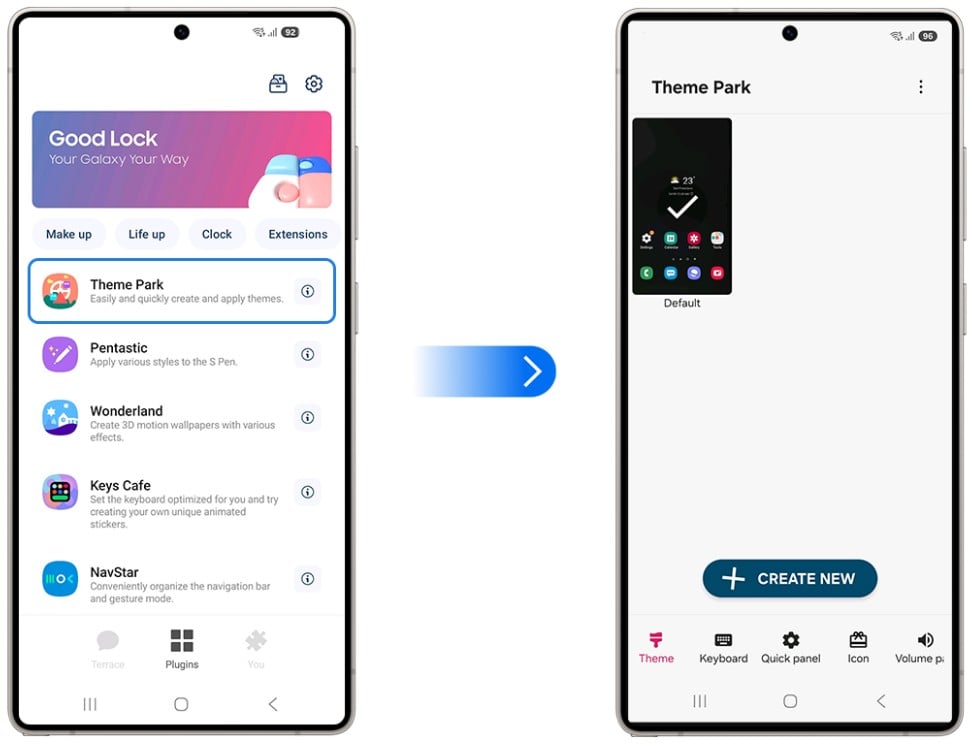
Image: Samsung
Set your background image, and Theme Park analyzes it to identify a dominant palette. It then groups a set of coordinated colors—primary, secondary, accent—that it maps to each UI element it controls. The whole process takes about thirty seconds and produces a preview of the full theme before you apply anything.
The auto-palette works well for most images. Nature photography, architecture, abstract art, and portrait shots with strong color all produce solid results. If the generated palette isn't quite right, you can tap into any color slot and replace it manually—the system is a starting point, not a constraint.
Light and dark mode themes are built separately, which matters more than it might seem. A phone set to automatic dark mode still looks cohesive in either mode because Theme Park accounts for each independently rather than applying one palette everywhere and hoping for the best.
What Theme Park actually does
Theme Park is more than just a normal theme for your phone. It includes so much more.
Samsung Keyboard gets the most granular treatment—background color, individual key colors (letters, numbers, and function keys styled separately), and the key-press effect. The keyboard is one of the most-touched surfaces on any phone, so getting the color right there makes the overall theme feel complete rather than piecemeal.
The Quick Settings panel—the control center you pull down from the top of the screen—gets background theming, button colors, shapes, and the brightness bar. The volume control panel that appears when you press a volume button is also themed. And the icon pack covers any icon's shape, color, and even image style.
The result, when everything is aligned, is a phone that looks like someone designed it—not assembled it from whatever default options happened to ship.
Theme Park vs. downloading a Galaxy Store theme
Galaxy Store themes are preset—you take what the designer made and apply it as-is. Some are excellent. But you can't change a downloaded theme's colors, adjust its icon shapes, or tweak the keyboard styling. Once applied, it's fixed.
Theme Park makes you the designer. Every color is under your control, every surface is adjustable, and the starting point is something personal to you—your own wallpaper—rather than a generic product someone else made for a mass audience.
The practical case for Theme Park over Galaxy Store themes: If you change your wallpaper regularly, Theme Park lets you rebuild the theme around each new image in under a minute. Downloaded themes require finding a new one that matches, which often involves paying again.
How to get Theme Park
- Cost: Free
- Available on: Samsung Galaxy devices via Galaxy Store and Google Play
- Requires: Good Lock main app installed first
- One UI compatibility: One UI 4.0 and above
Theme Park only works on Galaxy phones. Here are the best phones to run it on.
Theme Park only works on Samsung Galaxy devices, so if you're not already in the ecosystem, here are the most popular Galaxy phones worth considering:
Moto G 5G (2026) 128GB
- 6.7 inch display
- Rear Cameras: 50MP, 2MP
- Front Camera: 32MP

Galaxy A26 5G
- 6.7 inch display
- Rear Cameras: 50MP, 8MP, 2MP
- Front Camera: 13MP

Galaxy A27 5G 128GB
- 6.7 inch display
- Rear Cameras: 50MP, 5MP, 2MP
- Front Camera: 12MP

Galaxy A37 5G 128GB
- 6.7 inch display
- Rear Cameras: 50MP, 8MP, 5MP
- Front Camera: 12MP

Pixel 10a 128GB
- 6.3 inch display
- Rear Cameras: 48MP, 13MP
- Front Camera: 13MP

Theme Park: FAQ
Does Theme Park work with any wallpaper?
Yes, Theme Park analyzes any image you set as your wallpaper, and the automatic palette generation works with photos, artwork, abstract images, and anything else you choose.
Can I use Theme Park and a Galaxy Store theme at the same time?
Yes, Theme Park overrides the elements it controls—keyboard, Quick Settings, volume panel, and icon pack—so it will change those portions of a Galaxy Store theme while the rest of the theme remains active.
Does Theme Park work in both light and dark mode?
Yes, Theme Park builds separate light and dark mode themes simultaneously, so your phone looks cohesive whether it switches modes automatically or you toggle it manually.
Is Theme Park the same as One UI's Material You color system?
They're related but different. One UI's built-in color extraction is limited to a few accent colors applied to basic UI elements. Theme Park gives you per-element control over more surfaces, including the full keyboard and icon pack, with manual override options at every step.
Can I share a Theme Park theme with someone else?
Theme Park themes can be exported and shared via Galaxy to Share, another Good Lock module, which generates a shareable package of your full Good Lock configuration.
Scott Houghton
Jr. Staff Writer

Find a better phone plan
Thousands of cell phone plans unpacked. All the facts. No surprises.


.png?w=280&h=280&usm=20&usmrad=0.8&fit=crop "Best Cell Phone Deals for August 2026: Get the New iPhone 17 for Free")

.jpg?w=280&h=280&usm=20&usmrad=0.8&fit=crop "Best Back-to-School Phone Deals 2026: Free iPhones, Tablets, Watches, and More")


