
Roadside Assistance via satellite lets you text AAA or another roadside provider for help with a flat tire, dead battery, or lockout even when you have no cellular or Wi-Fi signal. It connects your iPhone directly to a roadside provider using the same satellite technology behind Emergency SOS via satellite.
It's one of several iPhone safety features built for situations where you're completely out of range of normal help.
What is iPhone Roadside Assistance via satellite?
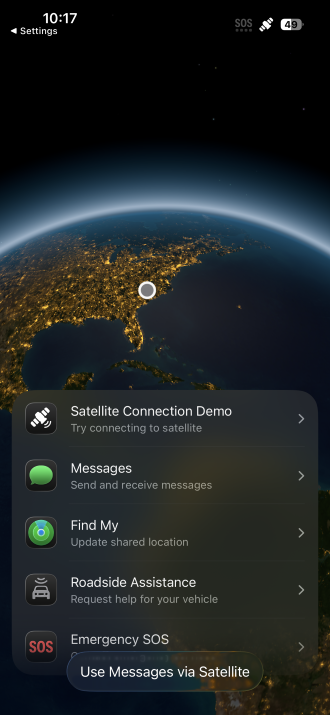
Image: Max McCaskill
Roadside Assistance via satellite is a feature that connects your iPhone to a roadside provider through a satellite link when you're outside of cellular and Wi-Fi coverage. It's built into the same Messages-based system as Emergency SOS via satellite.
The satellite hardware is already built into supported iPhones, so there's no separate accessory or subscription needed to connect. Your iPhone communicates directly with a satellite the same way it normally connects to a cell tower.
It can help with common car trouble like:
- Flat tires
- Dead batteries
- Lockouts
- Running out of fuel or charge
- Towing
Roadside Assistance via satellite is available on iPhone 14 and later.
How to request Roadside Assistance via satellite
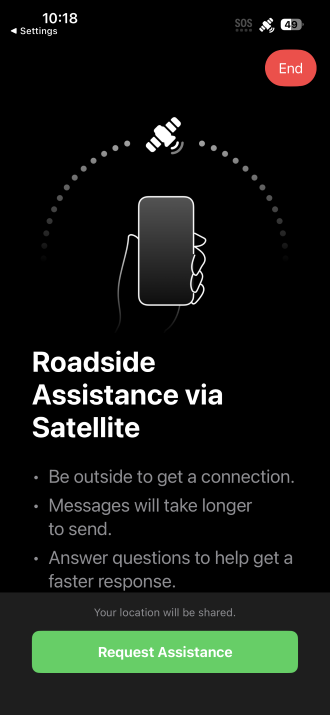
Image: Max McCaskill
You request help with the Messages app. It simply uses a satellite connection instead of cellular or Wi-Fi. Note that this feature is only available when your iPhone has no cellular or Wi-Fi signal, since that's what triggers the satellite connectivity to begin.
To request Roadside Assistance via satellite on your iPhone:
- Go outside to a spot with a clear view of the sky.
- Open the Messages app and start a new message.
- Type Roadside in the address field.
- Tap Roadside Assistance when it appears, then follow the onscreen instructions.
- Point your iPhone toward the satellite as directed, then answer the questions about your situation.
You can also start the process through Settings, then Satellite, or from Control Center by tapping the Cellular button, then Satellite. These options only appear when you're actually out of cellular and Wi-Fi range.
What does Roadside Assistance via satellite cost?
Roadside Assistance via satellite is free for two years after you activate an iPhone 14 or later. After that, the roadside provider may charge a fee, which is disclosed to you before help is dispatched.
In the United States, the service connects you with AAA or another roadside provider. If you're already a member, the cost is likely covered by your plan. If you're not, you'll be charged for the specific service after it's completed.
Where does iPhone Roadside Assistance work?
Roadside Assistance via satellite is available across the United States, including Puerto Rico. Coverage depends on satellite availability and terrain, so it works best outdoors with a clear, unobstructed view of the sky.
The feature requires a current version of iOS, since Apple has expanded provider partnerships through software updates since the feature launched.
Max McCaskill
Sr. Staff Writer

Find a better phone plan
Thousands of cell phone plans unpacked. All the facts. No surprises.


.png?w=280&h=280&usm=20&usmrad=0.8&fit=crop "Best Cell Phone Deals for August 2026: Get the New iPhone 17 for Free")

.jpg?w=280&h=280&usm=20&usmrad=0.8&fit=crop "Best Back-to-School Phone Deals 2026: Free iPhones, Tablets, Watches, and More")


.png?w=280&h=280&usm=20&usmrad=0.8&fit=crop "The Best Family Cell Phone Plans for 2026")
